Table of Contents
If you’ve been riding the Cricut wave for any length of time, you already know that your crafting potential is only as powerful as your finishing tools. While your Cricut machine cuts with surgical precision, it’s the heat press that breathes life into your designs, transforming ordinary blanks into personalized masterpieces. As we look toward 2026, the heat press landscape is evolving at breakneck speed—new smart technologies, refined temperature controls, and space-saving designs are reshaping what’s possible for home crafters and small business owners alike. Whether you’re pressing your first iron-on decal or scaling up to a full-fledged customization empire, understanding how to evaluate these machines is critical to your success.
The perfect heat press isn’t just about picking the most expensive model or the one with the flashiest display. It’s about aligning machine capabilities with your specific Cricut workflow, project volume, material preferences, and workspace constraints. In this comprehensive guide, we’ll dissect every factor that separates a mediocre press from a game-changing workhorse—no brand bias, no sponsored suggestions, just pure, actionable intelligence to help you make the most informed decision for your creative journey in 2026 and beyond.
Top 10 Heat Press Machines For Cricut
Detailed Product Reviews
1. Cricut EasyPress 3 Heat Press Machine (9"x 9") with Heat Press Mat (15" x 12"),Blue

Overview: The Cricut EasyPress 3 bundle delivers a 9x9-inch heat press paired with a protective mat, designed for hobbyists creating personalized T-shirts, tote bags, and pillows. This second-generation model integrates Bluetooth connectivity with the Cricut Heat app, offering precise temperature control up to 400°F while maintaining the simplicity of a household iron.
What Makes It Stand Out: The Bluetooth-enabled app control distinguishes this from basic heat presses, automatically sending exact time and temperature settings for your specific material combinations. The included 15"x12" heat-resistant mat provides instant workstation protection without additional purchases. Its compact footprint suits apartment dwellers, while safety certifications from UL, CSA, and FCC ensure reliable operation for daily crafting sessions.
Value for Money: Priced competitively for a bundle, purchasing the press and mat separately would cost 15-20% more. Compared to clunky commercial heat presses or inconsistent household irons, this mid-range investment delivers professional-grade results that survive repeated washing. The two-year warranty and Cricut’s established ecosystem add long-term value for serious crafters.
Strengths and Weaknesses: Strengths:
- App-based precision eliminates guesswork for time/temperature settings
- Even, edge-to-edge heat distribution prevents scorching
- Safety certifications and auto-shutoff provide peace of mind
- Mat inclusion creates ready-to-use package
Weaknesses:
- 9x9 size limits efficiency on larger garments like sweatshirts
- Requires smartphone for optimal functionality
- Heating element takes 3-4 minutes to reach 400°F
Bottom Line: Ideal for beginners and intermediate users focused on personal projects, this bundle offers the best balance of technology, safety, and convenience in its class. The app integration alone justifies the upgrade from manual models.
2. Cricut EasyPress® SE – 12 in x 10 in Heat Press - Heat Transfer Machine for T-Shirts, Sweatshirts, Blankets, Pillows, & More - Easy to Use - Blue

Overview: The EasyPress SE (Special Edition) provides a generous 12x10-inch ceramic-coated plate for tackling larger heat-transfer projects. Built for versatility, this manual model reaches 400°F with consistent edge-to-edge heating, making it suitable for sweatshirts, blankets, and banners without the learning curve of industrial equipment.
What Makes It Stand Out: The expanded pressing surface covers more fabric per application, reducing repositioning on XL garments. Its ceramic coating ensures dry, uniform heat distribution that professional decorators demand. The ergonomic handle design reduces wrist fatigue during extended pressing sessions, while the straightforward interface eliminates app dependency—perfect for users who prefer tactile controls over smartphone integration.
Value for Money: Positioned as a premium manual press, it costs approximately 25% more than the 9x9 EasyPress 3 but offers 33% more surface area. For crafters producing items for sale, the time saved on large projects quickly offsets the higher price. Unlike bundle options, you’ll need to purchase a heat-resistant mat separately, adding $20-30 to the total investment.
Strengths and Weaknesses: Strengths:
- Large plate size maximizes productivity on big projects
- Simple operation without app or Bluetooth complications
- Robust ceramic coating ensures durability
- Comfortable grip for consistent pressure application
Weaknesses:
- No included mat or app connectivity
- Bulkier storage requirements
- Higher entry cost for casual hobbyists
- Manual temperature settings require reference chart consultation
Bottom Line: Best suited for serious crafters and small business owners prioritizing speed and size over smart features. The SE’s straightforward reliability makes it a workhorse for high-volume production.
3. Cricut EasyPress Mini Heat Press - for Pressing Small Objects Like Shoes, Stuffed Animals, Hats & More - 3 Heat Settings & Precision Tip - Ceramic-Coated Heat Plate - Compact & Lightweight - Zen Blue

Overview: The EasyPress Mini revolutionizes heat application for unconventional surfaces. Measuring just a few inches with a precision-point tip, this tool navigates tight curves on shoes, hat brims, and stuffed animals. Three optimized heat settings simplify operation, while the ceramic-coated plate ensures safe application on delicate materials.
What Makes It Stand Out: The precision tip accesses areas impossible for standard presses, making it indispensable for detailed work. Its insulated safety base and auto-off feature protect users and workspaces, crucial for intermittent crafting. Weighing under a pound, it stores effortlessly in desk drawers, while compatibility with all major HTV brands eliminates material restrictions for specialized projects.
Value for Money: As the most affordable Cricut press, it delivers exceptional ROI for niche applications. Purchasing this as a secondary tool prevents damaging larger presses on small, awkward items. While it cannot replace a full-size press for apparel, it saves countless hours of frustration and ruined materials—effectively paying for itself after 3-4 successful projects that would otherwise be impossible.
Strengths and Weaknesses: Strengths:
- Unmatched maneuverability for complex shapes
- Instant heat-up and simplified three-setting dial
- Comprehensive safety features for casual users
- Perfect companion to larger Cricut machines
Weaknesses:
- Limited to small-scale applications
- No digital temperature readout
- Requires careful hand pressure control
- Not suitable for flat, large-area projects
Bottom Line: An essential specialty tool for any heat-transfer enthusiast. The Mini excels where other presses fail, making it a must-have addition rather than a primary purchase. The Zen Blue color offers a calming aesthetic.
4. Cricut EasyPress 3 Heat Press Machine (12 “x 10”) with Heat Press Mat (15.5" x 12.5")

Overview: This expanded EasyPress 3 bundle pairs a 12x10-inch smart press with an oversized protective mat for ambitious projects. The same Bluetooth-enabled technology as its 9x9 sibling controls temperatures up to 400°F, but the larger plate tackles sweatshirts, banners, and blankets with fewer repositioning steps, streamlining production for serious makers.
What Makes It Stand Out: The combination of app-based precision and professional-grade surface area is unique in the consumer market. The Cricut Heat app automatically adjusts settings for multi-layer projects, while the 15.5"x12.5" mat accommodates the press with room for fabric handling. Safety certifications remain comprehensive, and the auto-shutoff feature engages after 10 minutes of inactivity, protecting larger investment pieces.
Value for Money: At approximately 40% more than the 9x9 bundle, the price reflects genuine capability expansion. For crafters selling finished goods, the time saved per item creates rapid ROI. The included mat proportionally matches the larger press size, eliminating immediate accessory purchases. Compared to commercial clamshell presses costing 3x more, this delivers 90% of the performance at a fraction of the price and storage requirements.
Strengths and Weaknesses: Strengths:
- Large format with smart technology integration
- Comprehensive safety features and certifications
- Mat sizing perfectly complements the press
- Consistent results across repeated washes
Weaknesses:
- Premium pricing may deter hobbyists
- Requires substantial storage space
- App dependency may frustrate some users
- Heavier than smaller models for transport
Bottom Line: The ultimate home-based solution for high-output creators. If your projects regularly exceed the 9x9 capacity, this bundle’s efficiency gains justify every dollar. It’s a production-ready tool disguised as a consumer product.
5. Cricut EasyPress Mini Heat Press - For Pressing Small Objects Like Shoes, Stuffed Animals, Hats & More - 3 Heat Settings & Precision Tip - Ceramic-Coated Heat Plate - Compact & Lightweight - Raspberry
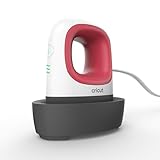
Overview: Identical in function to the Zen Blue variant, the Raspberry EasyPress Mini brings vibrant color to your crafting toolkit. This compact heat press specializes in applying iron-on vinyl, Infusible Ink, and sublimation materials to challenging surfaces like shoe seams, hat brims, and plush toys. Three heat settings cover all major material types without overwhelming beginners.
What Makes It Stand Out: The Raspberry colorway adds personality to a highly functional tool, making it easily identifiable in crowded craft rooms. The precision tip remains its defining feature, allowing spot-on application in concave areas. At just 1.5 pounds, it travels effortlessly to crafting events, while the auto-off feature provides security for users who frequently switch between multiple tools during complex projects.
Value for Money: Matching the Zen Blue model’s price point, this mini press offers identical ROI for specialized tasks. The color difference is purely aesthetic but helps users organize multiple tools by project type. As a secondary device, it prevents workflow bottlenecks when your primary press is occupied. The cost is recovered by salvaging just one project that would be ruined attempting with oversized equipment.
Strengths and Weaknesses: Strengths:
- Raspberry color adds visual appeal and organization options
- Rapid heat-up cycles increase project efficiency
- Insulated base protects surfaces during pauses
- Compatible with entire Cricut material ecosystem
Weaknesses:
- No temperature fine-tuning beyond three presets
- Manual pressure application creates slight learning curve
- Limited to projects smaller than the plate size
- Requires separate purchase for flat garment work
Bottom Line: Functionally equivalent to its Zen Blue counterpart, choose the Raspberry version for color-coding your craft station or personal preference. It’s an indispensable specialty tool that pays dividends in preserved materials and expanded creative possibilities.
6. Cricut EasyPress® 3-9 in x 9 in

Overview: The Cricut EasyPress 3 represents the latest evolution in consumer heat presses, blending professional results with smart technology. This 9x9 inch model targets serious crafters who demand precision and convenience for T-shirts, tote bags, pillows, and aprons. Its Bluetooth connectivity to the Cricut Heat app transforms the user experience, offering guided instructions and remote temperature monitoring that eliminates guesswork.
What Makes It Stand Out: The app integration is the headline feature, providing step-by-step guidance for different materials and projects. The ceramic-coated heat plate ensures even heat distribution, while precise temperature control up to 400°F handles everything from delicate heat-transfer vinyl to sublimation projects. This smart connectivity sets it apart from manual alternatives.
Value for Money: Positioned at a premium price point, the EasyPress 3 justifies its cost through time-saving automation and consistency. While more expensive than basic irons or off-brand presses, it eliminates ruined materials and streamlines workflow, paying for itself through reduced waste and professional results that last.
Strengths and Weaknesses: Strengths include exceptional temperature accuracy, rapid heating, intuitive app connectivity, and Cricut’s reliable build quality. The insulated safety base and auto-shutoff provide peace of mind. Weaknesses include reliance on the app for full functionality, a learning curve for traditionalists, and a price that may deter casual users who don’t need smart features.
Bottom Line: For dedicated crafters invested in the Cricut ecosystem, the EasyPress 3 is a worthwhile upgrade that streamlines workflow and delivers professional results consistently. The smart features justify the investment for high-volume users.
7. 3 Pack PTFE Teflon Sheet for Heat Press Transfer Sheet Non Stick 16 x 20 Heat Transfer Paper Reusable Heat Resistant Craft Mat

Overview: These PTFE Teflon sheets are indispensable accessories for anyone using a heat press, offering robust protection and versatility. The three-pack provides excellent coverage for various projects, with each 16x20 inch sheet delivering professional-grade heat resistance up to 600°F. They serve as a protective barrier between your heat plate and sensitive materials.
What Makes It Stand Out: The combination of extreme heat tolerance and reusability sets these apart from disposable parchment paper. Their waterproof, washable surface easily releases sticky materials like vinyl carriers and sublimation ink, while the tear-resistant construction withstands repeated use without degrading. The ability to cut custom sizes adds unlimited flexibility.
Value for Money: Exceptional value. This affordable three-pack effectively costs less than a single replacement shirt, yet protects your press, projects, and work surface indefinitely. They eliminate the ongoing expense of disposable alternatives and reduce material waste significantly, making them environmentally and economically smart for regular crafters.
Strengths and Weaknesses: Strengths include outstanding heat resistance, easy cleanup, multi-project versatility, and the ability to cut custom sizes. They work for heat pressing, baking, ironing protection, and crafting. Weaknesses include potential staining from sublimation inks over time and the initial learning curve for proper positioning. They’re accessories, not a standalone solution.
Bottom Line: A no-brainer purchase for any heat press owner. These durable sheets pay for themselves quickly while protecting your investments and improving project outcomes. Essential for both beginners and professionals.
8. Calogy Mini Heat Press, Heat Transfer Machine, Constant Temp Control, Insulated Safety Base, Fits for Crafts, T-Shirt, Hat, Cap, Pillows(White Pink)

Overview: The Calogy Mini Heat Press carves out a niche for crafters prioritizing portability and simplicity over raw power. Measuring just 4.5 x 2.9 x 5.1 inches with a 2.87 x 4.43 inch heat plate, this compact unit targets small-scale projects like hats, sleeves, and detailed garment work. Its phone-like footprint makes it ideal for cramped craft spaces or mobile crafting.
What Makes It Stand Out: The single-button control system is brilliantly intuitive—one press to increase temperature, two to decrease, three to switch units. This eliminates confusing menus while providing three clearly defined heat levels (284°F, 320°F, 356°F). The 15-minute auto-shutoff and insulated safety base address safety concerns admirably for a device this compact.
Value for Money: Positioned as an entry-level or secondary press, it offers solid value for casual crafters. It won’t replace a full-sized press for large projects, but its affordability makes it accessible for beginners or as a specialized tool for experienced users needing precision in tight spaces where larger presses can’t reach.
Strengths and Weaknesses: Strengths include remarkable portability, straightforward operation, real-time LED temperature display, and robust safety features. The compact size excels at pressing small or awkward areas. Weaknesses include limited temperature range, small plate size restricting project scale, and lower wattage requiring longer press times for thorough application.
Bottom Line: An excellent choice for beginners, mobile crafters, or as a complementary tool. For large or frequent projects, invest in a full-sized press instead. It fills a specific niche very well.
9. Cricut EasyPress 2 Heat Press Machine (9 in x 9 in), Ideal for T-Shirts, Tote Bags, Pillows, Aprons & More, Precise Temperature Control, Features Insulated Safety Base & Auto-Off, Raspberry

Overview: The Cricut EasyPress 2 remains a benchmark in consumer heat pressing, delivering professional-grade results without the complexity of industrial equipment. This 9x9 inch model balances speed, precision, and safety for T-shirts, tote bags, pillows, and aprons. It eliminates the guesswork and inconsistency of household irons while remaining approachable for beginners.
What Makes It Stand Out: It achieves the elusive sweet spot between iron convenience and heat press performance. The advanced ceramic-coated plate heats evenly in under two minutes, while adjustable time and temperature controls up to 400°F handle diverse materials flawlessly. The insulated safety base and auto-off feature demonstrate Cricut’s commitment to user safety without sacrificing usability.
Value for Money: Frequently available at discounts, the EasyPress 2 offers exceptional value compared to the newer EasyPress 3. You sacrifice Bluetooth connectivity but retain core performance at a significantly lower price point, making it ideal for budget-conscious crafters who prioritize results over smart features and app dependency.
Strengths and Weaknesses: Strengths include rapid, even heating, intuitive manual controls, proven reliability, comprehensive safety certifications, and a lightweight design for easy storage. It works seamlessly with Cricut’s ecosystem and third-party materials. Weaknesses include lack of app integration, no preset programs, and a price still higher than generic alternatives.
Bottom Line: A proven workhorse that delivers consistent, professional results. Skip the smart features and save money with this reliable performer that has earned its reputation through years of dependable service.
10. Cricut EasyPress Mini™ LT - Blue - Mini Heat Press for Pressing Shoes, Baby Clothes, T-Shirts, & More - Easy to Use with a Single Setting - Precision Tip - Compact & Portable Mini Iron

Overview: The Cricut EasyPress Mini LT addresses a specific challenge: applying heat transfers to small, awkward, or detailed areas where larger presses fail. This compact tool excels on shoes, baby clothes, hats, and intricate garment details that require precision over coverage. Its specialized design fills a gap that standard presses cannot.
What Makes It Stand Out: The precision tip and compact size allow access to tight spaces that standard presses cannot reach. Despite its small footprint, it reaches 355°F and features a ceramic-coated plate for even heat distribution. The single-setting design simplifies operation, while Cricut’s Heat Guide provides material-specific instructions for optimal results without complexity.
Value for Money: As a specialized tool, it commands a premium price but delivers unmatched capability for detailed work. It’s not a replacement for a full-sized press but rather an essential companion. For crafters focusing on detailed personalization, it prevents ruined projects and frustration, ultimately saving money on wasted materials through precise application.
Strengths and Weaknesses: Strengths include exceptional precision, portability, safety certifications, insulated base, and brand reliability. It handles curves, seams, and small areas brilliantly where larger presses would damage surrounding fabric. Weaknesses include limitation to small areas, single temperature setting requiring careful material selection, and a price point that feels high for its compact size.
Bottom Line: An indispensable specialized tool for serious crafters. If you press detailed items regularly, this mini press justifies its cost through precision and reliability. For basic flat projects, a larger press remains more practical.
Understanding Heat Press Machines for Cricut Projects
A heat press is essentially an industrial-grade iron that delivers precise combinations of heat, pressure, and time—three variables that Cricut’s Design Space calculates for you but your machine must execute flawlessly. Unlike household irons that create hot and cold spots, a quality press distributes consistent temperature across the entire platen while maintaining even pressure measured in pounds per square inch (PSI). For Cricut users, this precision is non-negotiable. Your intricate HTV designs, delicate Infusible Ink transfers, and sublimation projects demand laboratory-level consistency that only a dedicated press can provide. Think of it as the difference between baking a cake in a professional oven versus a toaster oven—both get hot, but only one delivers predictable, repeatable results.
Why 2026 Is a Pivotal Year for Heat Press Technology
The heat press industry is undergoing a quiet revolution as smart manufacturing and IoT integration become standard rather than premium features. By 2026, expect to see widespread adoption of AI-driven temperature calibration that automatically adjusts for ambient room conditions and material thickness. Bluetooth connectivity will likely evolve beyond basic controls to include firmware updates that expand material presets as Cricut releases new product lines. Energy efficiency regulations taking effect in North America and Europe will drive innovation in rapid-recovery heating elements, reducing warm-up times by up to 40%. Additionally, the push toward sustainable crafting is forcing manufacturers to develop platens with eco-friendly coatings that release fewer volatile organic compounds (VOCs) during heating. These aren’t futuristic concepts—they’re already in late-stage development and will dominate the market within the next 24 months.
Key Types of Heat Press Machines Explained
Clamshell vs Swing-Away: Which Design Reigns Supreme?
The clamshell design—where the top platen lifts vertically—is the traditional workhorse, prized for its small footprint and straightforward operation. In 2026, look for clamshells with gas-spring assist mechanisms that reduce the effort needed to close heavy platens, addressing the primary complaint from users with arthritis or limited upper body strength. Swing-away presses, where the top platen rotates completely away from the base, offer unobstructed access to your project and eliminate the risk of accidental contact with the heated surface. This design excels when working with thick substrates like wood slices or layered garments where precise placement is critical. The trade-off is double the bench space requirement and a higher price point. Your decision should hinge on three factors: workspace depth, project complexity, and physical comfort.
Draw-Out and Slide-Out Presses: Niche Options Worth Considering
Draw-out presses pull the lower platen toward you like a drawer, keeping the heat source stationary overhead. This design minimizes heat exposure to your hands and allows you to stage projects on the extended platen while another presses. Slide-out models function similarly but move side-to-side. Both styles are gaining traction among Cricut entrepreneurs who batch-produce items, as they reduce cycle time between presses by up to 30%. However, they require more horizontal space than clamshells and demand meticulous maintenance of the sliding mechanism to prevent alignment issues. In 2026, expect to see magnetic locking systems that secure the platen during pressing while allowing smooth operation between cycles.
Multi-Function Presses: The Swiss Army Knife Approach
These modular systems interchange platens for different applications—cap presses, mug wraps, plate attachments, and standard flat platens. For Cricut users who’ve expanded beyond apparel into the full spectrum of customizable blanks, these systems offer compelling value. The critical evaluation point is the attachment mechanism. Look for cast-aluminum bases with steel locking pins rather than plastic couplers, which degrade under repeated heating cycles. Also assess how quickly you can swap platens; in a production environment, a 5-minute changeover feels like an eternity. The downside is that jack-of-all-trades machines rarely excel at any single function compared to dedicated presses.
Essential Features That Define Quality
Temperature Accuracy and Consistency
A display reading 305°F means nothing if the actual platen temperature fluctuates between 295°F and 315°F across the surface. In 2026, demand specifications that include temperature variance ratings—quality manufacturers will advertise ±5°F or better across 90% of the platen surface. Investigate whether the press uses multiple heating elements or a single coil system. Dual-element designs, particularly those with independent thermocouples, maintain consistency even when pressing small designs on large platens. Ask about PID (Proportional-Integral-Derivative) controllers, which are the gold standard for temperature stability. These microprocessor-controlled systems learn your pressing habits and adjust heating cycles preemptively rather than reactively.
Pressure Distribution Systems
Even pressure is the silent killer of failed transfers. Uneven PSI creates “ghosting” where only portions of your design adhere, or “scorch rings” where excessive pressure damages substrates. Modern presses employ either spring-based or pneumatic pressure systems. Spring systems should use multiple heavy-duty springs (minimum four) arranged in a cross pattern, not just corner springs. Pneumatic presses, while pricier, deliver unparalleled consistency and are worth considering if you’re pressing large volumes or working with pressure-sensitive materials like sublimation coatings. For 2026, look for digital pressure readouts that display actual PSI rather than arbitrary 1-10 scales. Some advanced models will even store pressure profiles for different material combinations.
Platen Size and Project Versatility
The standard 15" x 15" platen handles most Cricut projects comfortably, but 2026’s trend toward oversized blanks and all-over prints is pushing demand for 16" x 20" and even 20" x 25" models. Before upsizing, realistically assess your typical projects. A larger platen consumes more energy, takes longer to heat, and can actually make small projects harder to press because you’re heating unnecessary surface area. Conversely, a 9" x 12" “craft press” might save space and money but will severely limit your ability to press adult-sized shirt designs or multiple items simultaneously. Consider a two-press strategy: a primary large press for apparel and a smaller, portable unit for quick projects and demos.
Digital vs Analog Controls
Analog controls—dials and knobs—offer simplicity and reliability but lack precision. Digital interfaces with LCD touchscreens dominate 2026’s mid-range and premium tiers, providing exact time, temperature, and pressure settings with memory presets for recurring projects. The real differentiator isn’t the display type but the control logic. Does the press alert you when it reaches temperature? Does it have a countdown timer that automatically releases pressure? Can it store custom profiles for Cricut’s ever-expanding material line? Look for firmware update capabilities, as this future-proofs your investment when Cricut introduces new transfer materials with different pressing requirements.
Material Compatibility Considerations
HTV and Iron-On Materials
Heat Transfer Vinyl remains the bread-and-butter for most Cricut users, but not all presses handle it equally. The ideal HTV press reaches temperature quickly (under 8 minutes from cold start) and recovers temperature within 15-20 seconds after opening. This rapid cycling prevents the “pre-activation” problem where vinyl begins curing during the approach phase. For layering multi-color designs, you need a press that maintains temperature within ±3°F during back-to-back presses. In 2026, anticipate new “low-temp” HTV formulations that press at 250-270°F instead of the traditional 305°F, requiring presses with precise low-end temperature control.
Sublimation Blanks
Sublimation demands higher temperatures (380-400°F) and lighter pressure than HTV, creating a different set of press requirements. The platens must be coated to prevent sublimation dye from migrating into the metal and contaminating future projects. Look for Teflon or poly-based coatings rated for sublimation temperatures, not just standard heat-resistant paint. The press should also include a “blow-out” paper tray or gap setting that allows sublimation gases to escape without creating pressure pockets that blur transfers. As Cricut expands its Infusible Ink line in 2026, presses optimized for sublimation will become increasingly relevant to the core Cricut demographic.
Infusible Ink Specifics
Cricut’s Infusible Ink system requires surgical precision—temperatures must be exact, pressure must be even but not crushing, and timing is critical. The sweet spot is typically 385°F for 40-60 seconds. Presses marketed toward Cricut users in 2026 will likely include pre-programmed Infusible Ink settings with visual countdowns and pressure release cues. The critical feature here is a “dwell timer” that starts only after the press reaches full pressure, not when you close the handle. This compensates for variable closing speeds and ensures every press gets identical treatment. Also examine the platen edge radius—Infusible Ink projects often use small blanks, and a slightly rounded platen edge prevents harsh pressure lines on coaster edges.
Specialty Materials on the Horizon
Cricut’s 2026 material roadmap reportedly includes wood veneer transfers, metallic foils requiring dual-temperature cycles, and stretchable sportswear films that need “pulsing” pressure. These emerging materials will require presses with programmable multi-stage cycles. Imagine a press that automatically ramps to 320°F, drops to 280°F, then finishes at 300°F—all while adjusting pressure between stages. This level of automation is moving from commercial equipment to prosumer models. If you’re investing in a press today that you expect to use through 2026 and beyond, verify it has the processing power and memory to handle complex pressing profiles. A simple on/off heater won’t cut it for next-generation materials.
Space and Workspace Optimization
Footprint vs Storage
A 16" x 20" swing-away press commands nearly 36" of depth when fully open, consuming more real estate than many craft room tables provide. Before falling in love with a machine, create a paper template of its operational footprint (not just its closed dimensions) and place it on your workspace. Consider vertical storage solutions—some 2026 models feature folding handles and detachable control boxes that reduce storage height by 30%. Wall-mounted swing arms allow you to stow a press against a wall when not in use, then swing it over your work surface for operation. This is particularly valuable for multi-purpose craft rooms that double as guest spaces or home offices.
Vertical Space Utilization
Heat presses generate significant upward heat, potentially damaging shelves, cabinets, or wall art positioned above them. Most manufacturers recommend 12-18 inches of clearance, but 2026’s insulated hood designs reduce this to 6-8 inches. If you’re building a dedicated crafting station, consider a press with a vented hood that directs heat forward rather than upward. For basement or closet setups, ensure adequate headroom for the handle at full extension—some presses require nearly 30 inches of vertical space to operate comfortably. Under-counter mounting kits are emerging that position the press at ergonomic height while preserving storage above.
Portability Factors
Cricut makers love craft retreats, markets, and pop-up shops. A 50-pound press might be manageable in a studio but becomes a dealbreaker when hauling up festival stairs. Portable presses under 30 pounds sacrifice platen size and pressure stability, but 2026 models using magnesium alloys and carbon fiber components are bridging the gap. Look for integrated carrying handles, cord management systems, and protective base covers that prevent scuffs during transport. Some manufacturers offer “mobile kits” with reinforced cases and detachable stands. Consider whether you’ll need to press during travel more than twice a year—if so, prioritize weight and case compatibility over maximum platen size.
Budget Planning and Value Assessment
Entry-Level Investment Strategies
Sub-$200 presses can produce professional results but require careful vetting. In 2026, this tier will be dominated by direct-to-consumer brands using social proof rather than traditional retail markup. The key is to identify which corners are being cut. Acceptable compromises include analog controls, smaller platens (12" x 10"), and basic warranties. Red flags include non-standard platen sizes that limit accessory options, welded rather than bolted frames (which can’t be adjusted if they warp), and thermostats with variance greater than ±15°F. Your strategy should be to prioritize temperature consistency over fancy features—an accurate, small press outperforms an unreliable large one every time.
Mid-Range Sweet Spot Analysis
The $300-$600 range represents the value apex for serious Cricut users. Here you’ll find 15" x 15" platens, digital controls with memory, auto-open features, and build quality that withstands daily use. In 2026, this segment will include AI-assisted pressure calibration and smartphone connectivity as standard features. When evaluating mid-range presses, calculate cost-per-press: a $500 press that lasts 5,000 presses costs $0.10 per use, while a $200 press that fails after 800 presses costs $0.25 per use. Look for models with field-replaceable heating elements and control modules—this repairability extends useful life dramatically and protects your investment.
Professional-Grade Considerations
Crossing into the $700+ territory brings commercial features like pneumatic pressure, interchangeable platens, and duty cycles that support continuous operation. For Cricut small businesses pressing 50+ items daily, this investment pays for itself through reduced labor time and eliminated rework. 2026’s professional presses will integrate with inventory management systems, automatically logging press cycles for quality control. The decision point isn’t just volume—it’s revenue protection. A failed press during a holiday rush can cost thousands in lost sales. Professional-grade equipment includes redundancy features like dual heating elements and backup thermostats that keep you operational even if one component fails.
Hidden Costs to Anticipate
The sticker price is just the beginning. Factor in $50-$150 for essential accessories: Teflon sheets, heat-resistant tape, alignment tools, and a quality infrared thermometer to verify accuracy. Shipping costs for 40+ pound presses can add $75-$100. Extended warranties, while optional, typically cost 15-20% of the purchase price but can include annual calibration services worth $100+ annually. Don’t forget the electrical upgrade—many high-wattage presses require dedicated 20-amp circuits, which might necessitate a $200-$400 electrician visit. Finally, consider the cost of “learning blanks”—inexpensive t-shirts and coasters you’ll sacrifice while mastering your new machine’s quirks.
Safety Features and Certifications
Auto-Shutoff Mechanisms
Modern presses must include auto-shutoff that kills power after 30-60 minutes of inactivity, but 2026 standards are raising the bar. Look for “smart shutoff” that detects not just time but temperature anomalies—if the thermostat fails and the platen overheats, it cuts power independently of the timer. Some models now include motion sensors that shut down if the press is moved while hot, preventing fire hazards during transport. Verify the auto-shutoff is UL or ETL certified, not just a manufacturer claim. The certification number should be printed on a label affixed to the machine, not just mentioned in the manual.
Heat-Resistant Components
The external temperature of a press after 30 minutes of operation tells you everything about its insulation quality. In 2026, premium models will maintain handle temperatures below 100°F even when platens exceed 400°F, thanks to aerogel insulation borrowed from aerospace applications. Examine the handle grip material—silicone overmolding should extend at least 4 inches from the heat source. Check the base; if it gets too hot to touch, it’s transferring heat to your work surface, potentially damaging finishes. Look for cool-touch bases with integrated air channels. The power cord should be high-temperature rated (look for “105°C” printed on the insulation) and exit the press through a heat-resistant grommet, not a simple plastic hole.
Electrical Safety Standards for 2026
As presses become more powerful and connected, electrical safety becomes paramount. Ensure any press you consider meets the upcoming IEC 60335-2-45:2026 standard for commercial heating appliances, which includes stricter requirements for grounding and leakage current. The plug should be molded (not removable) and include a ground fault interrupter (GFI) for models drawing over 1500 watts. For smart presses with WiFi or Bluetooth, verify they include FCC certification for electromagnetic interference—poorly shielded electronics can cause your Cricut to cut erratically or lose Bluetooth connection. The power switch should be a mechanical breaker that physically disconnects power, not just a soft-touch button that leaves electronics energized.
Performance Metrics That Matter
Warm-Up Time Efficiency
A press that takes 20 minutes to reach 400°F wastes energy and kills momentum. In 2026, premium heating elements using graphene-composite materials will achieve target temperatures in under 5 minutes. When evaluating warm-up claims, note whether the manufacturer specifies “from cold start” or “from standby.” Many presses idle at 200°F to appear faster, consuming phantom energy. A true efficiency metric is “temperature rise rate” measured in degrees per minute. A quality press should climb at 40-50°F per minute. Also consider the “ready” indicator—does it beep once at temperature, or does it have a pulsing light that continues until you open the press, reminding you it’s hot?
Recovery Rate Between Presses
Recovery rate—the time needed to return to set temperature after opening—separates hobby presses from production equipment. Each time you open the press, the platen loses 30-50°F. A slow recovery extends your total project time and can cause inconsistent results if you press before full recovery. In 2026, look for recovery rates under 20 seconds for standard platen sizes. This requires both powerful heating elements and intelligent control algorithms that temporarily overshoot the set temperature during recovery to compensate for thermal mass. Some advanced models display a “recovery progress bar” on the control panel, taking the guesswork out of timing.
Duty Cycle and Continuous Use
Duty cycle represents the percentage of time a press can operate at maximum temperature without overheating. A 50% duty cycle means 30 minutes of pressing followed by 30 minutes of cooldown. For Cricut businesses, you need 80% or higher. In 2026, commercial-grade presses will advertise “continuous duty” ratings, meaning they can run indefinitely at rated temperature. The key component is the contactor—the heavy-duty relay that switches power to the heating element. Look for contactors rated for 100,000+ cycles, not standard relays that fail after 10,000 cycles. The warranty should explicitly cover duty cycle failures; if it doesn’t, the manufacturer is hedging on their own performance claims.
Integration with Cricut Ecosystem
Design Space Compatibility
While no press directly connects to Cricut Design Space, the workflow integration is crucial. In 2026, expect third-party apps that bridge the gap—scanning your Design Space project and automatically programming the press with correct settings. Even without direct integration, your press should complement Design Space’s material settings. If Design Space recommends 305°F for 30 seconds, your press must hit that temperature within ±5°F and maintain it for exactly 30 seconds. Look for presses with “Cricut mode” presets that mirror Design Space’s recommended settings, reducing the chance of manual entry errors. Some manufacturers are developing QR code systems where scanning a Cricut material sheet automatically loads optimal press settings.
Material Setting Synchronization
Cricut’s material library grows quarterly, and keeping your press synchronized is a challenge. Premium 2026 presses will feature updatable material databases delivered via WiFi, similar to how Cricut updates Design Space. When evaluating a press, check whether the manufacturer commits to regular firmware updates and has a track record of supporting legacy models. The control interface should allow you to create and name custom settings, as Cricut often releases limited-edition materials with unique requirements. Consider presses that export settings via USB or Bluetooth—this allows you to share optimized profiles with your crafting community or back them up before a firmware update.
Project Scaling Considerations
Pressing one shirt is simple; pressing 50 for a team order reveals workflow bottlenecks. For scaling, you need a press with rapid operation features: auto-open at cycle completion, audible alerts that don’t require you to watch the display, and pressure settings that don’t drift after repeated use. In 2026, look for “production mode” that disables safety delays between presses, saving 3-5 seconds per cycle. That adds up to minutes per hour. Some presses include foot pedal operation, freeing both hands for positioning garments. If you’re scaling beyond 100 items per session, consider a dual-station setup—two smaller presses often outperform one large press because you can stage on one while pressing on the other, effectively doubling throughput.
User Experience Factors
Learning Curve Assessment
Even the best press is worthless if you can’t master it. In 2026, manufacturers are investing in augmented reality (AR) setup guides—point your phone at the press and see overlay instructions for calibration. Evaluate the manual’s quality before purchasing: is it a generic sheet translated from another language, or does it include Cricut-specific workflows? Check YouTube for tutorial videos from the manufacturer; a robust library indicates strong user support. The control panel should be intuitive enough that you can program a basic press cycle without consulting the manual. Presses with “guided setup” that walk you through your first press are invaluable for beginners.
Maintenance Requirements
All presses require maintenance, but some make it easier than others. The platen should be removable for cleaning without disassembling the entire machine. Heating elements should be accessible for replacement—some designs require a complete control box replacement for a simple element failure, turning a $30 part into a $150 repair. In 2026, self-cleaning platens using non-stick nano-coatings will reduce maintenance frequency. Ask about calibration requirements: how often must you verify temperature with a probe, and is the calibration process user-accessible or does it require factory service? A press that needs professional calibration every 6 months isn’t a bargain, even if it’s cheap upfront.
Community and Support Resources
The Cricut community is vast and vocal, but press-specific support varies wildly. Before buying, search Facebook groups and Reddit for mentions of the manufacturer. Are there active user communities sharing tips? Does the company respond to social media inquiries within 24 hours? In 2026, the best manufacturers host live troubleshooting sessions and maintain Discord channels where users can get real-time help. Check the availability of replacement parts—can you order a new handle or heating element directly from the manufacturer, or are you dependent on third-party sellers? A parts diagram in the manual indicates the company expects users to perform repairs, a sign of confidence in their design and commitment to longevity.
Warranty and Manufacturer Support
Standard Coverage Expectations
A 1-year warranty is the bare minimum; reputable manufacturers offer 2-3 years on heating elements and lifetime on frames. Read the fine print: does the warranty cover commercial use, or is it voided if you sell pressed items? In 2026, expect “no questions asked” replacement policies for the first 30 days, acknowledging that some units ship with defects. The warranty should explicitly cover temperature accuracy—if your press can’t hold ±5°F, it should be considered defective. Be wary of “limited lifetime” warranties that require registration within 10 days of purchase or exclude “normal wear and tear” without defining what that means.
Extended Protection Plans
Third-party extended warranties are often profit centers, but manufacturer-offered plans can be valuable. Look for plans that include annual professional calibration, free shipping for repairs, and loaner programs that send you a temporary press while yours is serviced. In 2026, some plans will include “technology upgrades”—if a new control module is released, you get it at no cost. Calculate the plan’s cost versus likely repairs: a heating element replacement is $50-$100, while a control board can be $150-$200. If the plan costs $75 and covers both for 3 years, it’s mathematically sound. Avoid plans with deductibles or that require you to pay shipping—those costs can exceed the repair value.
Customer Service Quality Indicators
Test customer service before purchasing. Email a technical question and measure response time. Call their support line—do you reach a human or an endless phone tree? In 2026, leading manufacturers offer video support where you show them the issue via your phone camera. Check their return policy: do they provide prepaid shipping labels, or do you pay return freight on a defective 50-pound machine? A company confident in their product offers free returns. Look for US-based service centers if you’re in North America; shipping a press internationally for warranty work can cost more than the machine is worth.
Environmental and Energy Considerations
Power Consumption Trends
A 15" x 15" press typically draws 1400-1800 watts—comparable to a space heater. Running it for 4 hours can consume 6-7 kWh, adding $0.75-$1.50 to your electric bill per session. In 2026, new inverter-based heating technology will reduce consumption by 25-30% by delivering power in precise pulses rather than continuous draw. Look for “eco-mode” that automatically reduces idle temperature after 10 minutes of non-use. Some smart presses integrate with home energy management systems, scheduling warm-up during off-peak hours. Calculate the annual operating cost: (wattage ÷ 1000) × hours used × your kWh rate. A $100 price difference is irrelevant if one press saves $50 annually in electricity.
Eco-Friendly Material Options
The press itself isn’t the only environmental factor—consider how its design reduces waste. Precision temperature control minimizes ruined projects, which means fewer blanks in landfills. Some 2026 models include “scrap mode” settings optimized for using up material remnants. Look for presses with removable silicone pads that can be replaced individually rather than discarding the entire lower platen assembly. Manufacturers using recycled aluminum for frames and biodegradable packaging are emerging; supporting them aligns with the sustainable crafting movement. The most eco-friendly press is the one you keep for 10 years, so prioritize repairability over recyclability.
Heat Dissipation and Ventilation
Poorly designed presses turn craft rooms into saunas, especially during summer. In 2026, active cooling systems—small fans that exhaust hot air away from the operator—are becoming standard on premium models. The press should have heat vents positioned to direct airflow away from your face and hands. If you’re building a ventilation system, note the press’s CFM (cubic feet per minute) heat output rating; this helps size an exhaust fan appropriately. For basement setups, consider a press with a rear heat exhaust that can be ducted directly to a window vent, preventing heat buildup in your workspace. Some models include thermal imaging targets that let you verify with an IR camera that heat is dissipating as designed.
Making Your Final Decision
Creating a Personal Requirements Checklist
Start by auditing your last 20 Cricut projects. What sizes did you make? What materials? How many at once? This data reveals your true needs versus aspirational wants. Create a weighted scoring system: assign 30 points to temperature accuracy, 25 to platen size, 20 to safety features, 15 to warranty, and 10 to connectivity. Score each press you’re considering. Include deal-breaker criteria: “must fit in 24” deep cabinet" or “must weigh under 40 pounds.” This objective framework prevents emotional decisions based on flashy features you’ll never use. Revisit your checklist quarterly as your skills evolve; a press that’s perfect today might be limiting in 18 months.
Testing Before Committing
If possible, test presses in person at craft fairs, maker spaces, or retailer demo days. Bring your own Cricut-cut design and blank to press. Pay attention to handle ergonomics—does it require awkward wrist angles? Listen to the machine; excessive buzzing indicates cheap relays. Feel for vibrations that suggest poor assembly. In 2026, some online retailers offer “home trial” programs with refundable deposits, shipping you a demo unit for 7 days. If that’s unavailable, leverage return policies: buy from sellers offering 30-day no-fee returns, test rigorously, and don’t settle. A press is a long-term relationship; a bad match is expensive to correct.
Purchase Timing Strategies
Heat press pricing follows seasonal patterns. Black Friday and post-holiday January sales offer 20-30% discounts, but selection is limited. New models typically launch in March and September; buying the previous generation in February or August can save 15-25% while still getting modern features. In 2026, watch for “trade-in” programs as manufacturers push smart upgrades. If you own a basic press, you might get $50-$100 credit toward a connected model. Avoid purchasing immediately after Cricut announces new materials; press prices often spike due to increased demand. Instead, wait 6-8 weeks for the market to normalize. Set price alerts on major retail sites and be ready to act when your target model drops 10% below its 90-day average.
Frequently Asked Questions
What size heat press do I realistically need for Cricut projects if I’m just starting out?
A 12" x 10" platen handles most beginner projects including children’s apparel, tote bags, and standard-size signs. It forces you to learn proper placement and pressure control without the intimidation factor of a large machine. However, if you plan to press adult t-shirts or multiple items simultaneously within your first year, invest in a 15" x 15" model. The price difference is often less than $100, and the versatility prevents early frustration.
How do I verify my heat press temperature is accurate without expensive equipment?
Purchase an infrared thermometer gun for $20-$30. Point it at the center of the platen when fully heated, comparing the reading to the press display. For deeper validation, place a piece of sublimation paper on the platen—if it starts to yellow at 380°F, your press is running hot. Cricut’s temperature test strips, available in their materials section, provide a visual confirmation at specific temperatures. Test quarterly and after any firmware update.
Can I use a heat press for both HTV and sublimation, or do I need separate machines?
One quality press handles both if it reaches 400°F and has a clean, non-porous platen coating. The challenge is preventing cross-contamination—sublimation dye can ghost onto subsequent HTV projects. Always place protective paper under sublimation projects, and after sublimating, run a “cleaning press” at 400°F with white butcher paper to absorb any residual dye. If you’re running a business doing both processes daily, two presses save time and eliminate risk.
What’s the difference between a $200 press and a $600 press in real-world use?
The $600 press maintains consistent temperature across the entire platen, recovers heat in 15 seconds instead of 45, and includes safety features like auto-shutoff and cool-touch handles. It also offers a 3-year warranty versus 1 year, and the frame won’t flex after 500 presses. For hobbyists pressing 5-10 items monthly, the $200 press suffices. For anyone pressing weekly or running a side business, the $600 press pays for itself in reduced ruined projects and faster completion times.
How much ventilation do I need in my craft room for a heat press?
For occasional use (under 2 hours daily), natural airflow from an open window or door suffices. For daily use exceeding 4 hours, install a small exhaust fan (50-100 CFM) positioned to pull air across your press and out a window. The 2026 standard is to position the press 12 inches from a window with a reversible fan. Never place a press in a fully enclosed closet without active ventilation—temperatures can exceed 120°F, damaging electronics and creating fire risks.
Will my heat press work with Cricut materials released after I buy the machine?
Yes, if the press has accurate temperature control and you manually input new settings. However, presses with updatable firmware and expandable preset libraries make the transition seamless. When Cricut releases new materials, they publish recommended time, temperature, and pressure settings. A future-proof press allows you to save these as custom presets. In 2026, look for models with at least 50 custom memory slots and USB/WiFi update capability.
What’s the safest way to store a heat press in a home with children or pets?
Allow the press to cool completely (30-45 minutes), then lock it in a closed position if it has a latch. Store it unplugged with the cord wrapped separately to prevent accidental activation. For swing-away models, rotate the platen to the side and secure it with a Velcro strap. Consider a lockable storage cabinet or a high shelf that requires a step stool to access. Some 2026 models include electronic locks that require a PIN to operate, adding a layer of child safety.
How often should I replace the Teflon sheet or heat platen cover?
Replace Teflon sheets when they show scratches, discoloration, or adhesive buildup that won’t clean off—typically every 100-150 presses for heavy use. Platen covers (silicone foam pads) last 1-2 years with regular use. Inspect monthly for compression marks or tears. In 2026, new self-healing silicone pads extend life to 500+ presses by resisting cuts from weeding tools. Always keep a spare on hand; a damaged pad can ruin an entire production run before a replacement arrives.
Can I press mugs, hats, or other non-flat items with a standard flat press?
Flat presses can handle curved items with varying success. For mugs, you can achieve decent results using a silicone wrap to hold the transfer in place, but the pressure is uneven and results are inconsistent. For professional-quality results on curved substrates, you need dedicated attachments. However, if you only press mugs occasionally (fewer than 5 monthly), a flat press with a 3D pressing technique works. For hats, the curvature is too extreme; even multi-function presses struggle with cap attachments. Evaluate whether these projects are core to your business or occasional experiments before investing in specialized equipment.
What should I do if my heat press starts smoking or smells like burning plastic?
Immediately unplug the press using the plug, not the power switch. Do not open the press—oxygen feeds fires. Evacuate the area and have a fire extinguisher rated for electrical fires (Class C) nearby. Once cooled, inspect for melted wiring or insulation. This failure is almost always a warranty issue if the press is under 2 years old. Contact the manufacturer before attempting any repair. In 2026, smart presses with thermal runaway protection should prevent this scenario by cutting power before smoke occurs. If your press lacks this feature, it’s time to upgrade.